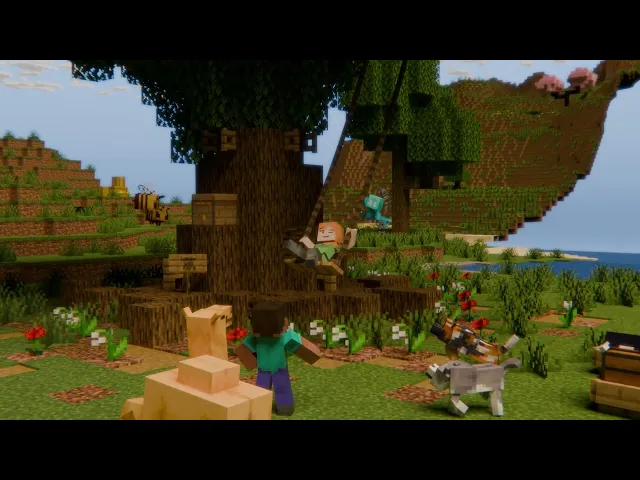
These were questions we asked ourselves, my friend Jeff and I. How can we use what we know: Design and Development, to make a Minecraft experience people can enjoy. We combined our passions for Minecraft, Coding, Design, and Game Development to make SimplyFellas. I worked on the website and branding, while he worked on creating and maintaining the modpack.
In the beginning, we just had a modpack that we created for ourselves: reviewed and critiqued by our other friends. Then we added more and more mods and additions. We were building an experience that suited us, what gave US fun and joy, so we took what was fun and made it a separate thing. Thus the SimplyFellas modpack was born, no later than a week I proposed a website to advertise the modpack and idea.
Having experience design and developing websites as well as brands, I took up the responsibility. My reasoning was that I could kill two birds with one stone, develop my web development skill as well as branding and marketing. I started by making the icon

I made the capybara themed logo because my friends and I share a love for capyaras so I wanted to bring that passion into the logo as well. I took a real capybara picture with a distinct pose, then outlined it, added a circle, added its prominent features, then added a negative space giving it legibility.
I also created a pack icon, because we needed one for when it gets published to the big modpack websites.

created in Blender, I got my friends and my own skins, then using a Minecraft asset library called "Ice Cube" - it provided the means to make the render. The asset library has a Minecraft rig for animation and for making general renders, but it also included the game's blocks and models I could pull from as well. Saving me countless hours of possible manual work.
My idea and concept of this render was to showcase the friends aspect. It had to have some striking poses, exaggerated facial features, and peculiar atmosphere.
Once I had finished the logo, I started planning the website. I wanted to use a website builder like Framer, WordPress, and others but I opted instead to just develop and code my own. I had seen what capabilities these builders could do, but I just preferred coding and designing my own from scratch, just to keep the sense of ownership. Thus I assembled my technology stack.
I used the standard: HTML, CSS, JavaScript, but I also used the React Framework, Motion and GSAP for animations, and GitHub for version control / website hosting (initially).
I had done a mock up in Figma just to get a feel for how I wanted to do things, and here it is:

Making a friendly, playful, and warm hero image


in my head, I pictured Minecraft Steve and Alex sitting around a campfire. Adding the other creatures: chicken, parrot, zombies, and creepers came afterwards. I even went into Minecraft and scouted locations that could fit my idea. I did not copy the terrain, and instead just made it from scratch using the Ice Cube asset library, block by block. I got the moon texture from the game and made it its own plane object then rotated it in view.
I wanted to make it lively in a sense, so I made the trio of zombies visually look like they are plotting something. For the creeper, it's peeking over the tree in a bendy "creepily" manner because its a creeper. Alex's petting a chicken, there's a chicken eating seeds, fish being roasted on the campfire, and Steve's parrot is sitting on his head. I just assigned mini stories because I thought it be more alive.
Creating mod specific renders
The goal for making these was to showcase each mod in a special way. To make a render that accurately depict what it would feel like to use / play the mod. Plus to give a little highlight to the mod and the creator itself. Each section was doing to have copy text that brings visitors to the mod's website.
1 - The Create Mod


Create is a mod that adds a new level of functionality to regular Minecraft. It has gears, gear boxes, ratios, shafts, steam engines, water wheels, drills, convener belts, and more "mechanical" additions to give the game a more steampunk feel. For this render, I wanted to show players that steampunk / mechanical aesthetic. On the right of the frame, I wanted to export a waterwheel that the mod has but the exporter broke so I did not get what I wanted. I improvised by using a gear model and stretched it to give it a waterwheel look. In the middle of the scene exists the boiler, a block structure responsible for generating the steam power. The things poking out are the steam pistons which generates the motion. Connected to the pistons, are these shafts that extend out to separate components which can do different things. Drill a block, break a tree, collect, etc.
I added Steve and Alex enjoying themselves, hanging out on the create structure doing different poses because the scene needed some life.
2 - Moog's Structures

Inspired by Jean-Honoré Fragonard's "The Swing", I wanted to emulate the feeling of that painting. A frozen moment in time. The background tree was taken from the game, the structure itself was exported using a tool I found on GitHub called "MiEx' it's a level exporter that turns the Minecraft block generation into a 3D model that people can use.
From that, I took a Moog's structure and added a swing in Blender. I posed Alex swinging on the swing, then made Steve point to the ground as to say: "Get down here, you're going to get hurt". To keep with the same lively aspect, I also added different creatures, like dogs, camel, skeletons, cat, alley, bees doing different hings.
3 - Adorable Hamsters


I wanted to showcase the Hamsters mod in a cute way, I quickly thought of a composition where I juxtapose Steve and Alex. I thought of Alex as the adoring kind, she was a kind of person that thought of that would try to pet all the cute creatures she could get her hands on. While Steve on the other hand prefers to avoid them. The hamsters were manually reassembled in Blender because the model itself was not able to be downloaded from the internet. So I pieced the base model and texture from the mod. Rigged it and gave it the ability to pose.
I aligned the camera with an area I liked then placed Alex and Steve a way from each other. Posed Steve so he's visually struggling due to the hamsters on top of him, then put a separate hamster closer to the camera with Alex petting it the scene that difference. The lighting was fixed in the second image, and I even added some post processing effects like glow, glare and camera distortion.
4 - Sophisticated Storage


For this scene, I wanted to depict someone struggling to handle all of their items. Sophisticated Storage as a mod provides solutions for inventory issues. It has these drawers that you can place down which gives you plenty of room to store all of your game items. I wanted to show viewers that idea. So I put Alex in a predicament that has her struggling where to put the blocks she carrying. On the left of the frame, I have the storage drawers opened and ready, on the right: Steve is carrying more items for Alex to put into the drawers.
Keeping to the theme of my other renders, I added the same post effects as before but this time, I added procedural clouds that I made from scratch using Blender's geometry nodes. This system was carried into other renders that I made, to give the skies a bit more life. The advantage of using this system is that I can alter the amount, the color, and the size to my liking. Gives me flexibility in how I wanted the image to turn out.
5 - Carry On


Carry On, is a small mod that allows players to pick up blocks, and mobs. You can pick up a stone block, place it back down or chuck it at a something. You can do the same to mobs. For players, you can pick up players, place them down and or chuck them high into the sky. You sometimes even place mobs on players heads. This was the inspiration behind this render, my friends and I trolled each other, throwing each other in different directions. It was funny at times, so I channeled that essence into this render.
Steve is happily "sleeping" when Alex decided to put mobs onto Steve's head. Alex does not know that Steve is actually still a wake, but continues to put more stuff onto Steve's head because it would be funny seeing his reaction. The background is a house I quickly built then exported into Blender. Struggled to find a suitable location for 10 minutes then found a good camera position. In my head, I envisioned how I wanted the frame to look, then placed the models one by one and posed it as I went on. The facial reactions was something what I focused on the most because I needed it to carry the frame.
Putting things together
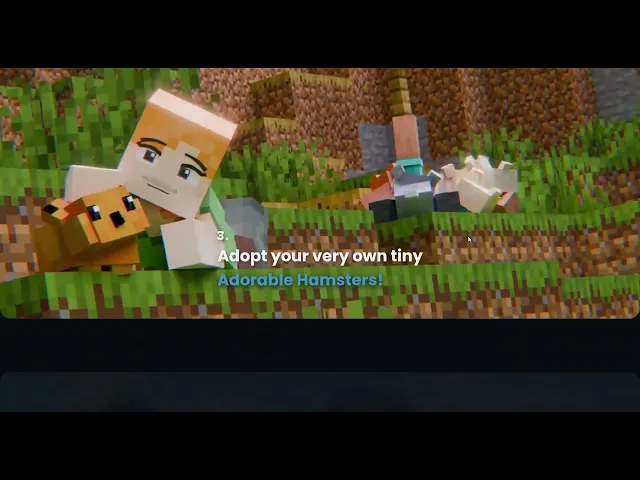
This video shows the website progress during its 40% mark, I had a header navigation, a hero section, individual mod sections, a discord community section, and a basic footer. But I did not have the page breakers downloads page just yet.
After a bit of time, I added more responsibility, tweaked the footer and added some more features like a call to action that has randomized phrases for each visit. Something was off… the images didn't fit what I wanted from a "Friend modpack", thus the great redesign began.
Redesigning the Renders
My reasoning for the redesign was that having Steve and Alex there didn't accurately fit the theme of the modpack, and that was "Playing with friends" so I reevaluated the situations and designed the scenes more around friends. So I gathered skins of my friends and my own and modeled situations around us.
The Hero

I replaced Alex and Steve with two of my friends, changed some reactions. Added another friend sleeping by the campfire in the front of the frame, then added myself sitting down looking at the campfire. The chicken now is on the slab, instead of sitting on the side of it. The clouds were also changed to the 3D ones I created.
1 - The Create Mod

Same area, but different situation. I gave two of my friends a moment where they are puzzled at the fact that the contraption they are looking at is not working. My friend on the left is pointing and the one on the right is adjusting his head to see the issue. I am hanging off the shaft, and my other friend is gazing into the horizon. I needed the poses this time to be more exaggerated / deliberate this time around because I felt it would feel more alive if it was that way.
2 - Moog's Structures

Keeping to the previous environment, I kept most of it the same, but this time. I had my own character jump from the swing, while my friends cheer me on. On my own face, I made it so that it appears more joyful. I also put both my arms up to exaggerate the physical model a bit more.
3 - Adorable Hamsters

For the hamsters mod, a thing you can do to the hamsters is throw them. Because of that, I wanted to bring that idea to life inside this redesign. I had all four of us in a cross, then had us throw the hamsters to each other. One is stuck in the air flying to my friend in the red. The friend on the left is getting ready to throw the hamster to my friend in black, on the right.
I changed the composition so that its a bigger frame to allow people to look at different things happening. I had done this before so why stop now.
4 - Sophisticated Storage

I replaced Steve and Alex and placed my friends and I into the picture. Had my friend in black be the one who is struggling this time. My other two friends brought more while I peacefully watched. I did help them previously, I'm just on break.
5 - Carry On

I replaced Steve with myself and Alex with my friend, the other two were laughing. Rude.
The basis of this frame was the prank nature of the mod, friends pranking me, while they laugh. I wanted that to be shown.
Discord Section
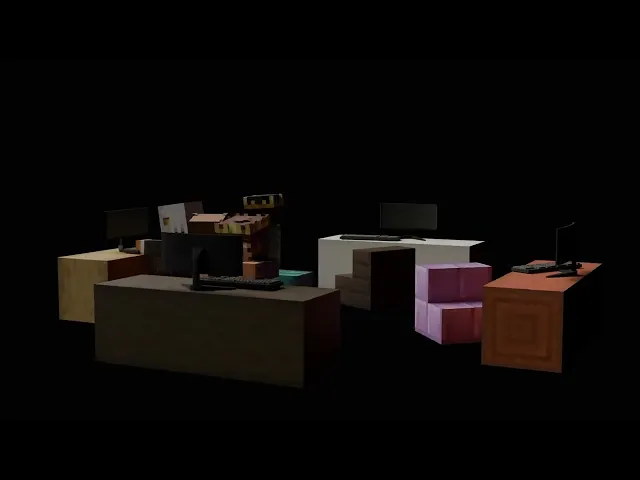
Before all I had for the discord section was a widget that I got from Discord itself but I wanted it to more a live, so what I did was make a loop that could communicate the group activity of Discord. Me and my friend who are on the computer are cheered on by our other friends. I could have modeled a larger number of people to communicate the nature of mass communication but this simple one served it purpose, personally.
Page Breakers


These are the little separators I placed around the website. My goal is the same as my renders, to give more life. I didn't want empty rectangles as breakers so I assembled a set of images based on the level of depth viewers are at. Inspired by the different levels of Minecraft - surface, caves, deepslate, to bedrock.
Putting it all Together
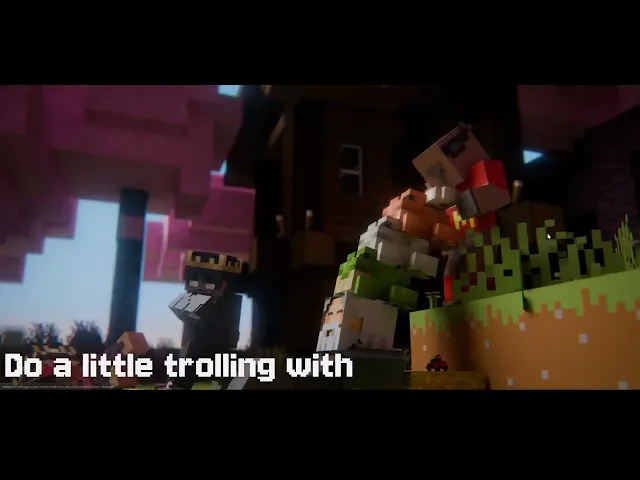
This was a video I took before adding all the page breakers.
Final Changes and What I Learned
The small changes that I add were in the code itself, a lot of it I refactored. I added a downloads page, and linked to a partner website we are sponsored by. The website is live at
In doing this project, I learned a lot about JS, Motion, GSAP, layout, hierarchy, sections composition, 3D, and storytelling. A lot of hard ship occurred, but i triumphed through it all. I am proud of what I made, and hope to make more stuff like this.
I hoped you like reading through this breakdown, please send me a message on how you thought. It would be greatly appreciated.

